

Embedded Sub-Account Portal
Mittr’s embedded portal is a drop-in UI you hand to your end customers so they can manage their own webhook endpoints and inspect delivery activity without leaving your product. Under the hood it runs on a separate tenancy primitive called a sub-account: a child identity scoped to your parent client, with its own endpoints, events, and capability-scoped session tokens.
The word “portal” only appears in the URL you embed (/portal/:token)
and the UI your customers see. Everywhere else (API paths, data models,
SDKs) uses sub-account.
The shape of the integration
Section titled “The shape of the integration”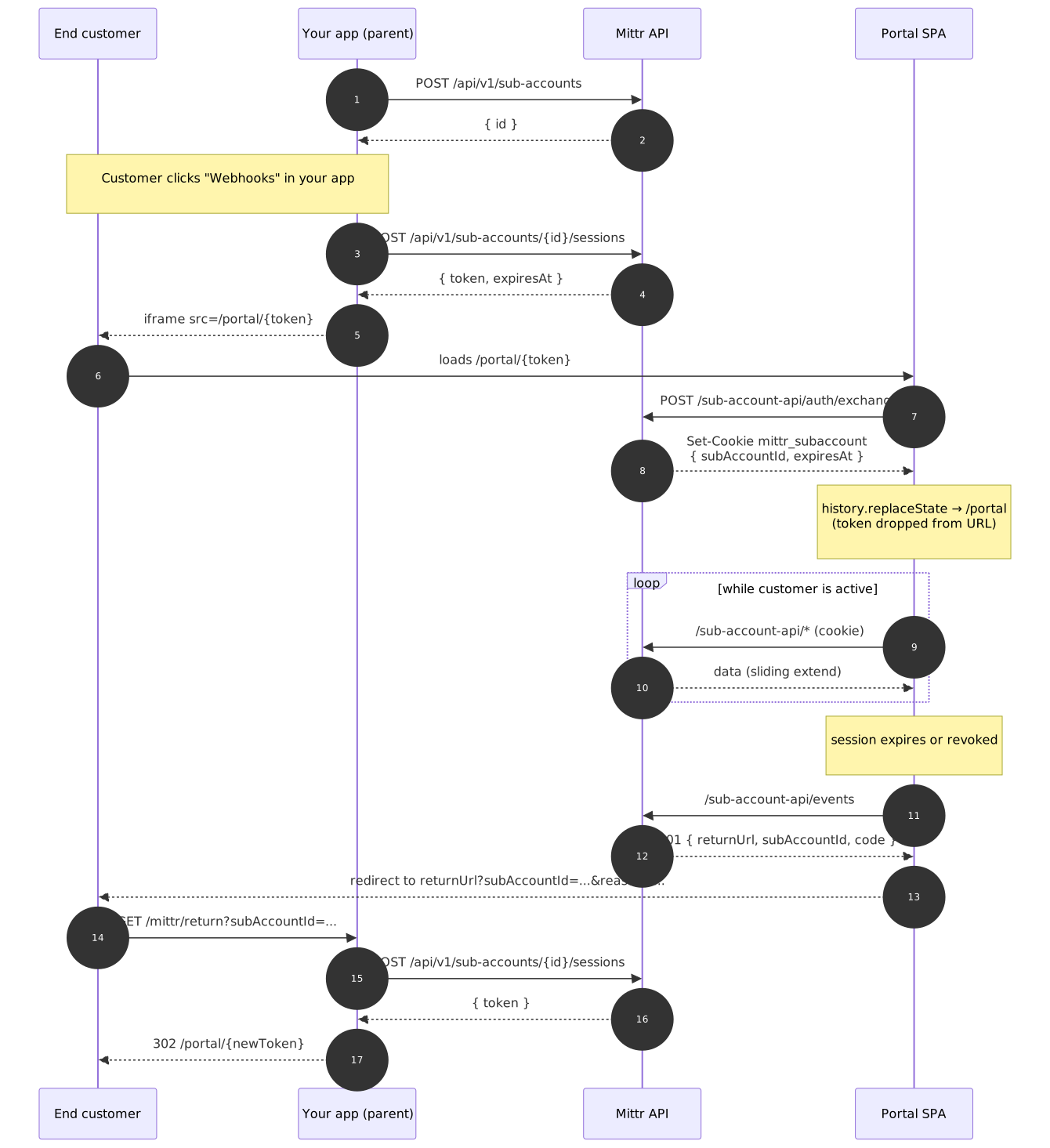
1. Create a sub-account
Section titled “1. Create a sub-account”curl -X POST https://app.mittr.io/api/v1/sub-accounts \ -H "X-API-Key: $MITTR_API_KEY" \ -H "Content-Type: application/json" \ -d '{ "externalId": "cust_001", "name": "Acme Merchant", "email": "[email protected]", "metadata": { "tier": "gold" } }'externalId is your own identifier for this customer and must be unique
per parent client. Everything else is optional. The response carries the
Mittr UUID you’ll pass back when minting sessions.
2. Set a default return URL
Section titled “2. Set a default return URL”A return URL is where Mittr sends the customer when their session expires or is revoked. Your app handles the URL by authenticating the customer and minting a fresh session link. This is a standard “re-auth bounce” flow.
You can set it once per parent client and have every session inherit it, or override per mint. Set it via the dashboard (Sub-accounts → “Set URL” banner) or the API:
curl -X PATCH https://app.mittr.io/api/v1/sub-account-settings \ -H "X-API-Key: $MITTR_API_KEY" \ -H "Content-Type: application/json" \ -d '{ "defaultReturnUrl": "https://your-app.example/mittr/return" }'Without a default (and without a per-session override), POST /sub-accounts/{id}/sessions rejects with MISSING_RETURN_URL.
3. Mint a session link
Section titled “3. Mint a session link”curl -X POST https://app.mittr.io/api/v1/sub-accounts/{id}/sessions \ -H "X-API-Key: $MITTR_API_KEY" \ -H "Content-Type: application/json" \ -d '{ "expiresIn": 3600 }'Response:
{ "token": "eyJhbGciOi...", "expiresAt": "2026-04-18T20:00:00Z"}Hand the customer https://app.mittr.io/portal/{token}.
The token is:
- HMAC-SHA256 signed. Mittr verifies integrity on every request.
- Scope-limited. Claims carry
endpoints:read,endpoints:write,events:read,events:retry,deliveries:read. Pass a narrowerscopearray to restrict further. - Stateful. A
sub_account_sessionsrow tracks it server-side. You can revoke, list, or audit from the dashboard. - Single-use at the URL. On first open the SPA swaps it for an
httpOnly cookie and strips the token from the address bar. Opening the
same URL a second time returns
409 ALREADY_CONSUMED.
4. Embed the portal
Section titled “4. Embed the portal”Point an iframe (or full navigation) at the link:
<iframe src="https://app.mittr.io/portal/eyJhbGciOi..." style="width:100%; height:100%; border:0;" allow="clipboard-write"></iframe>The SPA exchanges the token for a cookie on first load, so the raw JWT never lingers in the URL bar, referer headers, or browser history.
Two flags on your Mittr deployment control how the embed behaves:
| Setting (env) | Effect |
|---|---|
SUBACCOUNT_CROSS_SITE_EMBED=true | Session cookie is issued with SameSite=None; Secure; Partitioned (CHIPS) instead of the default SameSite=Lax. Required whenever the iframe is served from a different eTLD+1 than your app (e.g. iframe on acme.example pointing to mittr.io). |
SUBACCOUNT_ALLOWED_FRAME_ANCESTORS=https://acme.example,https://foo.example | Whitelist of origins allowed to embed /portal/*. Mittr omits X-Frame-Options on portal responses and emits Content-Security-Policy: frame-ancestors <list>. Unset = hard deny (default). |
Same-origin setups (portal served from your own subdomain) can leave both
off: the default SameSite=Lax cookie and the implicit X-Frame-Options: DENY are the safest posture.
For true third-party embedding:
# Mittr deployment envSUBACCOUNT_CROSS_SITE_EMBED=trueSUBACCOUNT_ALLOWED_FRAME_ANCESTORS=https://acme.example,https://foo.exampleBrowser support for partitioned cookies (CHIPS): Chrome 114+, Edge 114+,
Firefox (flag), Safari (limited). Browsers that don’t recognise the
Partitioned attribute silently ignore it, so the cookie still works in
first-party contexts and fails safely in third-party ones.
5. Handle expiry and the return URL flow
Section titled “5. Handle expiry and the return URL flow”Sessions slide forward while the customer is active (every request
within 30 minutes of expiry bumps expires_at forward by one hour,
capped at max_expires_at). When a session does expire, or you revoke
it, the next API call returns 401 with:
{ "error": "Your session has expired.", "code": "SESSION_EXPIRED", "returnUrl": "https://your-app.example/mittr/return", "subAccountId": "5f2c4c7d-..."}The SPA appends subAccountId and the error code (as reason) to the
returnUrl when redirecting:
https://your-app.example/mittr/return?subAccountId=5f2c4c7d-...&reason=SESSION_EXPIREDSo one generic return URL works for every sub-account. You don’t need to register a URL per customer. Your endpoint:
- Reads
subAccountIdfrom the query string. - Authenticates the customer (cookie, SSO, whatever you normally use).
- Verifies the authenticated customer actually owns that sub-account (never trust the query param blindly).
- Calls
POST /api/v1/sub-accounts/{subAccountId}/sessionswith your parent API key to mint a new Mittr session. - Redirects to the new
/portal/{newToken}URL.
The SPA also caches the return URL and sub-account id in localStorage
on first exchange,
so a stranded customer (expired cookie with no valid token in the URL)
still gets the “Get a fresh session” button pointing back at your app.
Reference handler
Section titled “Reference handler”A minimal handler in Go. Adapt to your framework. In production, do
not trust the subAccountId query param verbatim: look up the
authenticated customer in your own DB and verify they actually own that
sub-account before minting.
func mittrReturn(w http.ResponseWriter, r *http.Request) {    // 1. Authenticate the customer against your own session / SSO.    user, ok := currentUser(r)    if !ok {        http.Redirect(w, r, "/login?next="+url.QueryEscape(r.URL.String()), http.StatusFound)        return    }
    // 2. Verify the requested sub-account belongs to this user.    subID := r.URL.Query().Get("subAccountId")    if !user.OwnsMittrSubAccount(subID) {        http.Error(w, "forbidden", http.StatusForbidden)        return    }
    // 3. Mint a fresh Mittr session with your parent API key.    body, _ := json.Marshal(map[string]any{"expiresIn": 3600})    req, _ := http.NewRequest(http.MethodPost,        "https://app.mittr.io/api/v1/sub-accounts/"+subID+"/sessions",        bytes.NewReader(body))    req.Header.Set("Content-Type", "application/json")    req.Header.Set("X-API-Key", os.Getenv("MITTR_API_KEY"))
    res, err := http.DefaultClient.Do(req)    if err != nil || res.StatusCode >= 300 {        http.Error(w, "mint failed", http.StatusBadGateway)        return    }    defer res.Body.Close()
    var out struct{ Token string `json:"token"` }    _ = json.NewDecoder(res.Body).Decode(&out)
    // 4. Bounce the customer back into the portal with the fresh token.    http.Redirect(w, r,        "https://app.mittr.io/portal/"+url.PathEscape(out.Token),        http.StatusFound)}
6. Revoking sessions
Section titled “6. Revoking sessions”# single sessioncurl -X DELETE https://app.mittr.io/api/v1/sub-accounts/{id}/sessions/{sessionId} \ -H "X-API-Key: $MITTR_API_KEY"
# all sessions for a sub-account (log out all devices)curl -X DELETE https://app.mittr.io/api/v1/sub-accounts/{id}/sessions \ -H "X-API-Key: $MITTR_API_KEY"Revocation takes effect on the next request: the middleware checks
revoked_at on every authenticated call.
Theming
Section titled “Theming”The portal surface inherits a handful of CSS custom properties so it
blends into your brand without a separate stylesheet. Override them on
:root of the document that serves Mittr (or via a reverse-proxy
injection) and the SPA picks them up at paint time:
| Variable | Purpose |
|---|---|
--bg-000 | Top-level chrome (header, footer) |
--bg-100 | Page background |
--bg-200 | Secondary surfaces (tab groups) |
--accent-main-100 | Primary action color |
--accent-main-900 | Primary action tint (icon backgrounds) |
--chart-delivered | Delivered status dot |
--chart-failed | Failed status dot |
--chart-dead | Dead status dot |
--warning-100 | Warning banners (return URL prompts) |
The portal also ships with its own light/dark toggle (independent of the
parent dashboard’s theme), persisted to the mittr-portal-theme
localStorage key.
Security model at a glance
Section titled “Security model at a glance”- JWT HS256 with a server-side
sub_account_sessionsregistry. Revocation, listing, and activity counters (last_used_at,use_count) are all enforced on the session row, not the token. - Single-use handoff:
consumed_atis set atomically during the/auth/exchangecall. A leaked URL cannot mint cookies on a second device. - httpOnly cookie, scoped to
/sub-account-api. The raw JWT never reaches JavaScript after the swap.SameSite=Laxby default;SameSite=None; Secure; Partitioned(CHIPS) when cross-site embedding is enabled so each embedding parent gets its own cookie jar. - Sliding expiry with an absolute ceiling. Active users don’t see re-auth prompts; idle sessions time out within the refresh threshold.
- Capability scopes are encoded in signed claims. Request handlers
gate every route with
claims.HasCapability(...), so a narrower scope at mint time is enforced all the way through.
Caveats
Section titled “Caveats”- Return URL is frozen at mint time. Updating the default does not retroactively repoint in-flight sessions. Revoke and re-mint if you need a fleet-wide migration.
- Session sliding is fire-and-forget. The
expires_atbump runs in a background goroutine. In the worst case a request right at the edge of expiry may 401 once before the next request picks up the new timestamp; treat it as a normal re-auth.